Check slots.
Browse available dates and times. Pick the appointment that fits your plans, then click Book to submit it.
See the options. Make your choice.
Find available dates. Keep your applicants organised.
Book directly on VFS, with fewer manual steps.
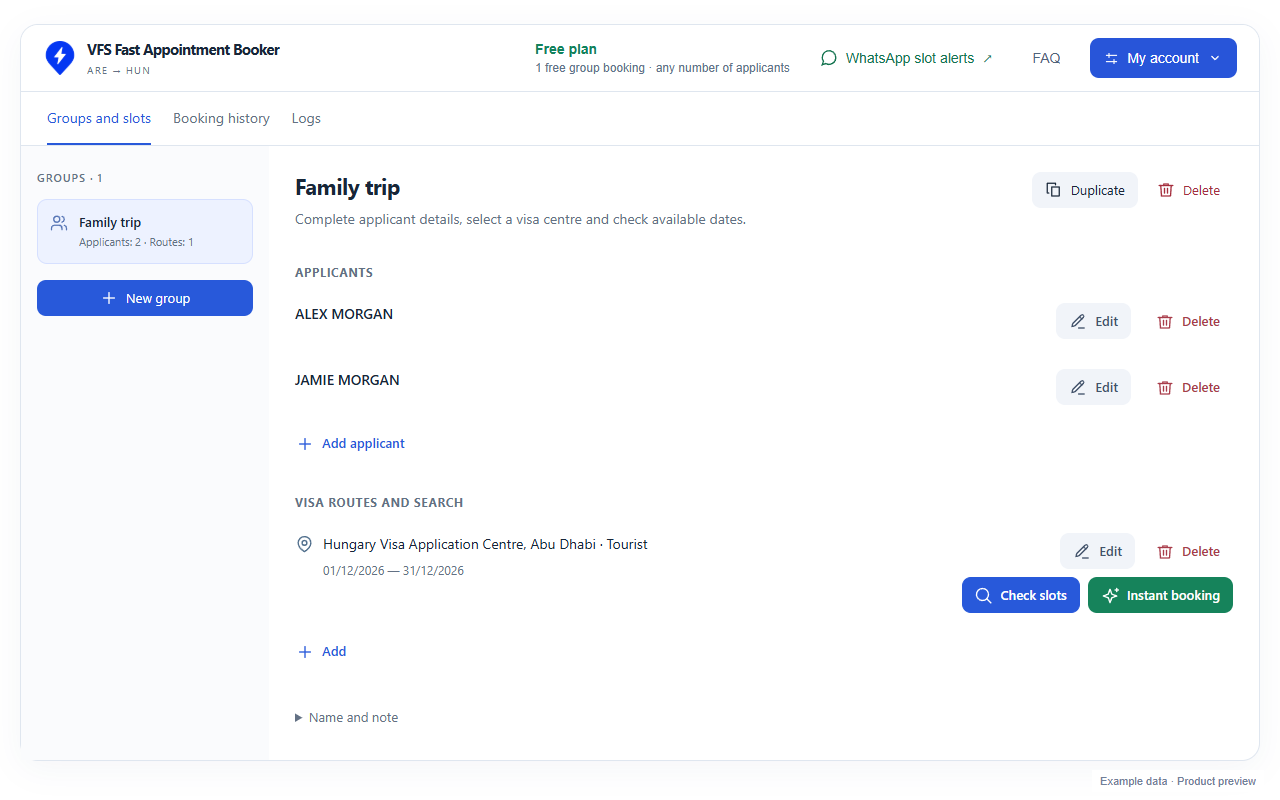
Actual extension interface · Example applicant and appointment data
Choose how you want to handle the next available appointment.
Browse available dates and times. Pick the appointment that fits your plans, then click Book to submit it.
Set your acceptable dates. The extension searches for a suitable slot and attempts to book it within your selection.
Prepare your group once. Keep the route, dates and booking history together.
Save applicant details and organise them into groups.
Choose a date range or individual acceptable days.
Review booking history and access support logs.
Add the extension to Chrome, open the VFS website and sign in to your extension account.
Add your applicants. Choose the application centre, visa type, category and acceptable dates.
Use Check slots or Instant booking. Enter an email verification code when VFS asks for one.
Your first successful group booking is free, with any number of applicants permitted by VFS.
After your free booking, use applicant credits for successful bookings.
30 days of unlimited bookings with an active Unlimited pass.
Manage your balance and access inside the extension. VFS fees are separate.
It helps you organise applicants, find available appointments and submit bookings directly on the VFS website. Choose Check slots to pick a time yourself, or Instant booking to attempt a booking within your selected dates.
Your first successful group booking is free, with any number of applicants permitted by VFS. After that, you need enough applicant credits for your group or an active Unlimited pass to search and book. Searching does not spend credits.
Yes. Save applicants and organise them into groups. Group size and booking availability are subject to the limits on the VFS website.
Yes. Set a date range or choose individual acceptable days, then select your visa application centre, visa type and category.
No. Availability and booking outcomes depend on VFS. The extension cannot create slots or guarantee a booking. Any applicable VFS fees are separate.
This is a separate Chrome extension for searching and booking on the VFS website. If you prefer notifications on your phone, explore Slotbys appointment alerts instead.
Contact Slotbys support. You can download troubleshooting logs from the extension to help us investigate a problem.
Start with your first free group booking.
VFS Fast Appointment Booker is an independent tool by Slotbys, not affiliated with or endorsed by VFS Global. Appointment availability and booking outcomes depend on VFS.
Looking for WhatsApp or Telegram alerts?